How to use PowerView.ps1 and PowerView.py
This writeup will give the reader the necessary commands and information to begin using the popular tool PowerView.ps1 and its alternative PowerView.py. These tools are utilized in this case to enumerate and attack windows active directory environments and is a crucial tool in doing so.
What is PowerView
PowerView is a tool that is a part of the PowerSploit suite of tools. PowerSploit is a powershell post exploitation framework created by HarmJ0y.
 PowerShellMafia
PowerView.ps1 and PowerView.py are utilized to enumerate a windows active directory environment to gather useful information for further exploitation. It uses .NET classes to help enumerate and exploit active directory.
Getting Started
Usage - PowerView.ps1
Download the PowerView.ps1 script from the github repository.
 PowerShellMafia
Next we have to import the script into our target computers powershell session.
Import-Module .\PowerView.ps1Now that its imported we can start exploring the various commands. In order to see all of the different commands and options that we have with this script imported we should cite the documentation at.

Each of these commands return a lot of information. It is helpful to use different filters to select exactly what you wanting to view for each command. This can be done by using the following.
{command} | select {field1}, {field2}Get Domain Info
Lets first grab some information about the domain by running the following.
Get-NetDomainGet Domain Users
This command returns a lot of information and would be better viewed with different filters. For instance the second command filters by only the usernames.
Get-NetUser

# Just the domain users.
Get-NetUser | select cn

# Username, password last set, and last logon
Get-NetUser | select cn,pwdlastset,lastlogon
Get Domain Groups
This command does the same as users but now we are returning information about the groups in the domain.
Get-NetGroup

# Get members of a specific group
Get-NetGroup "Domain Admins" | select member
Get Processes
This command will return all running processes on the machine. This is useful for finding potential privilege escalation avenues.
Get-Process

# Get more granular information.
Get-Process | Select-Object Name, Id, CPU, Handles, WorkingSet
Usage - powerview.py
Now what happens if maybe we don't have a shell yet on a system or maybe we are unable to run powershell due to our script getting flagged by AV/EDR? This is where powerview.py comes in. This tool doesn't need to be ran on the target and gives us a nice little web interface to work with.
Download the PowerView.py by following the installation guide below.
 aniqfakhrul
Starting the powerview.py server
Below is the command to start the powerview.py instance and to setup the webserver.
# Domain Credentials = "TargetDomain.local/username:'password'
# Target IP address = 192.168.210.97
# Local web server config = --web --web-host 0.0.0.0 --web-port 3000 --web-auth user:password1234

powerview TargetDomain.local/username:'password'@192.168.210.97 --web --web-host 0.0.0.0 --web-port 3000 --web-auth user:password1234
When we visit the powerview.py web server at http://127.0.0.1:3000 and login we are greeted with a page similar to the image below.
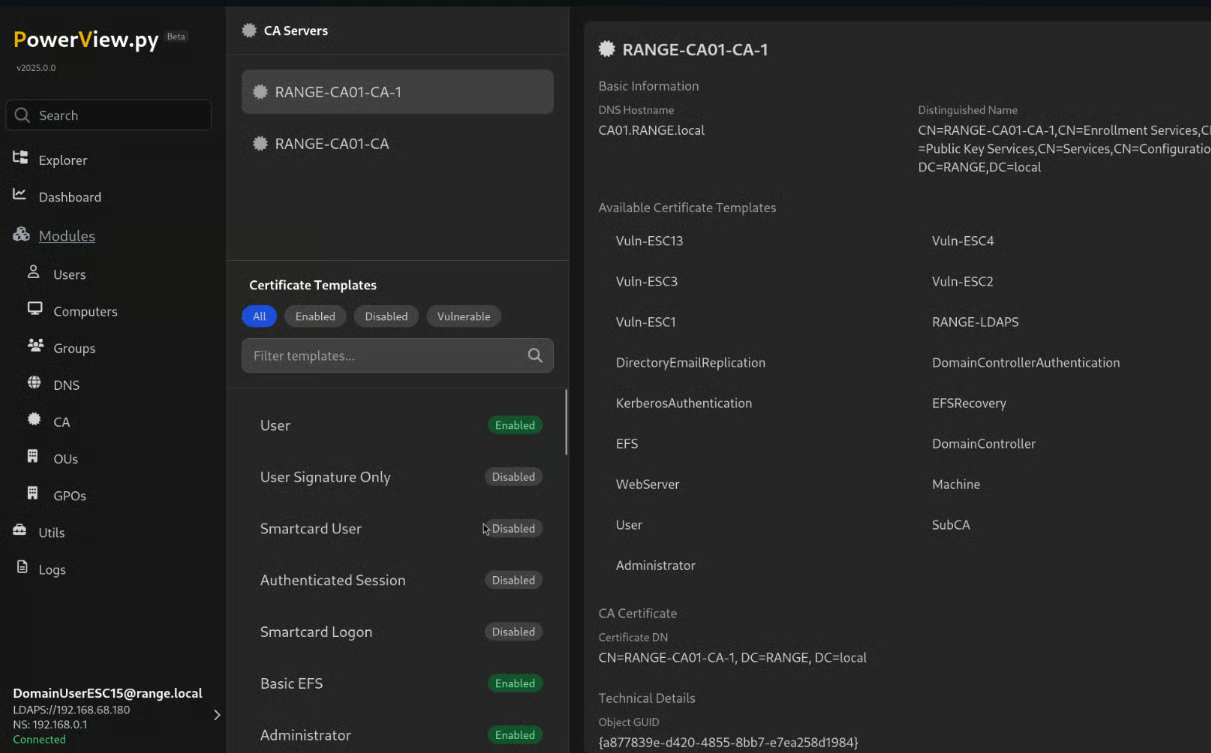
Here we can enumerate and identify vulnerabilities Groups, DNS, Certificate Authorities, Organizational Units, and Group Policy Objects.
Powerview.py also adds some great functionality with file transfers and exploring different connections between objects. Utilizing a tool like this once initial access is obtained can be a huge benefit to identify pivot points and post exploitation of the environment.
Powerview.py commands remotely
Not only can we use this web interface but we can also run commands like we could in the PowerView.ps1 examples.
Here we can see that we have authenticated to the machine 192.168.68.162 as the user "RANGE\rangeadm" and are able to run commands similar to those we would run via PowerShell.ps1.
Get-DomainUser -Properties samaccountname -Select 3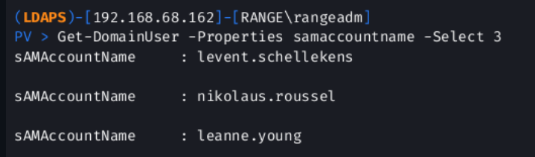
The PowerView tools are extremely helpful when performing Penetration Tests and Red Team Exercises. Having these tools on your belt when it comes to performing these engagements will help assessors identify vulnerabilities in active directory environments.
Resources
 aniqfakhrul